Returner · upgrade rehearsal with Kane CLI

Returning users lose their work

Promise: “My saved assessment survives the model update, and I see the new model”

Both builds served at http://127.0.0.1:56719

Browser state X-ray · key names only (via Chrome DevTools)
Both releases use localStorage: assessmentData
Before upgradelocalStorage: assessmentData
New userlocalStorage: assessmentData
Returning userlocalStorage: assessmentData

Returning user

Yesterday's profile on the new build

fail
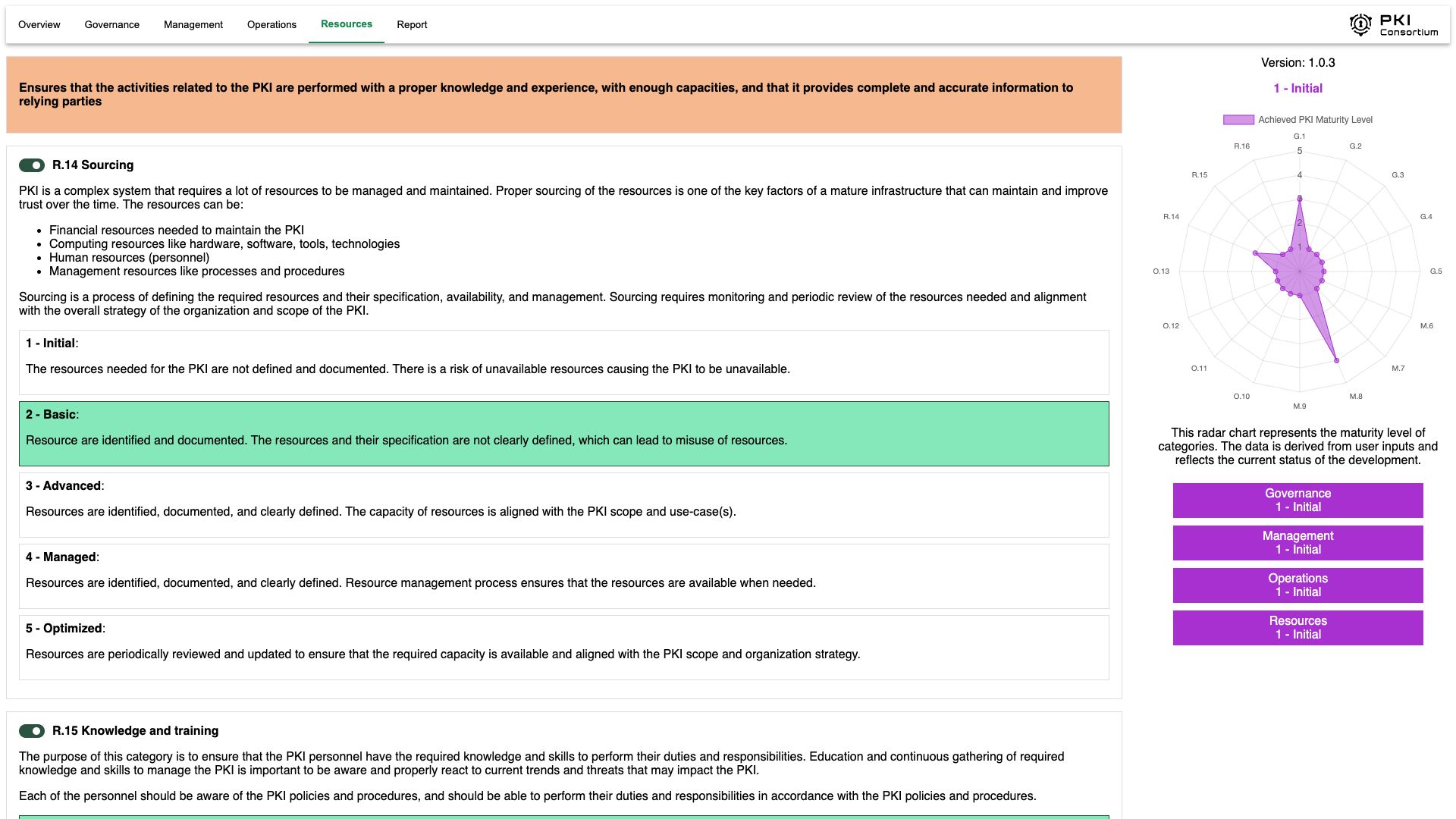
Kane's final screenshot for the Returning user check
Kane's final screen · click to enlarge
Browser console errors from Kane's evidence pack
  • Cannot read properties of undefined (reading 'result')
  • Failed to load resource: the server responded with a status of 404 (Not Found)

Kane's summaryThe page hits an error while starting up and never displays the assessment interface. Fix the startup path that reads the missing result value, then reload and confirm that the Report, Governance, Management, and Resources tabs render with the saved assessment. evidence: console_error: Cannot read properties of undefined (reading 'result')

Kane objective and steps

Reload the page. On the Report tab, verify the Assessment Name is exactly "Returner-419b90fd" and the Assessor Name is exactly "Saved work c66e88a8-e86". Open the Governance tab: verify "Strategy and Vision" is at level "3 - Advanced" and a category named "Cryptography" is listed. Open the Management tab: verify "Infrastructure management" is at level "4 - Managed". Open the Resources tab: verify "Sourcing" is at level "2 - Basic". This is a read-only check: do not type, select or change anything. Release promise: My saved assessment survives the model update, and I see the new model

  1. navigate: Navigate to http://127.0.0.1:56719
  2. press_key: PRIMARY: Reload the page
  3. wait: PRIMARY: wait for the Report tab to load
  4. wait: PRIMARY: wait for the Report tab to load
  5. wait: Waiting while checking for the Report tab
19.6 Kane credits · 151 s · Open in TestMu Test Manager

Before upgrade

Saves work on the previous build

pass
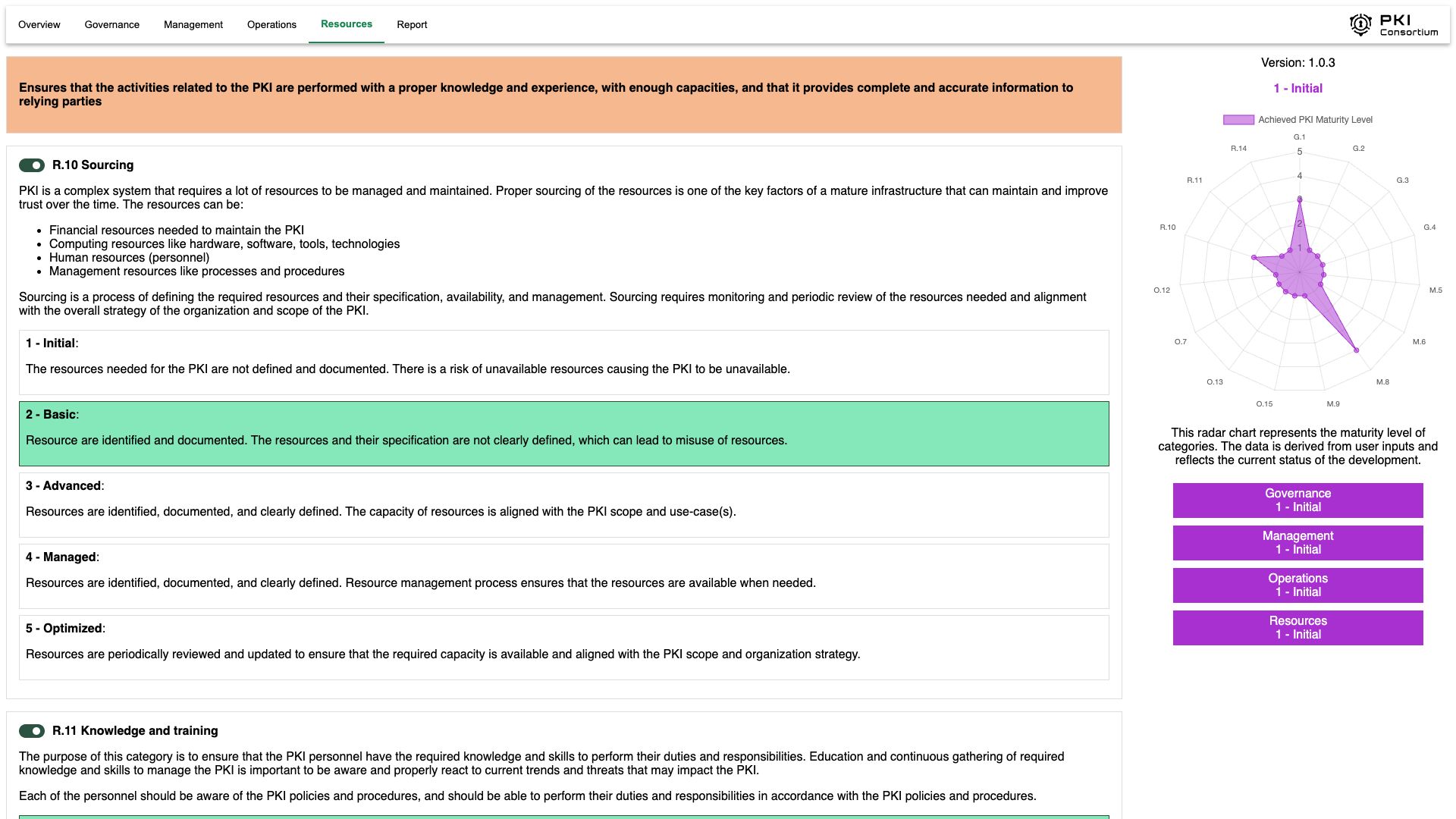
Kane's final screenshot for the Before upgrade check
Kane's final screen · click to enlarge
Browser console errors from Kane's evidence pack
  • Failed to load resource: the server responded with a status of 404 (Not Found)

Kane's summaryCompleted the requested PKI maturity assessment updates. Entered Assessment Name “Returner-419b90fd” and Assessor Name “Saved work c66e88a8-e86” in the Report tab. Selected “3 - Advanced” for Strategy and Vision, “4 - Managed” for Infrastructure management, and “2 - Basic” for Sourcing. Reloaded the page and confirmed that the entered names and all three selected maturity levels were retained.

Kane objective and steps

Open the Report tab. Type "Returner-419b90fd" into the Assessment Name field and "Saved work c66e88a8-e86" into the Assessor Name field. Open the Governance tab and select level "3 - Advanced" for "Strategy and Vision". Open the Management tab and select level "4 - Managed" for "Infrastructure management". Open the Resources tab and select level "2 - Basic" for "Sourcing". Reload the page. On the Report tab, verify Assessment Name is exactly "Returner-419b90fd" and Assessor Name is exactly "Saved work c66e88a8-e86". Open the Governance tab and verify "Strategy and Vision" is at level "3 - Advanced". Open the Management tab and verify "Infrastructure management" is at level "4 - Managed". Open the Resources tab and verify "Sourcing" is at level "2 - Basic".

  1. navigate: Navigate to http://127.0.0.1:56719
  2. click: Clicking the Report tab in the top navigation bar
  3. wait: queued plan (2 steps): type "Assessment Name:"; type "Assessor Name:"
  4. type: Type "Returner-419b90fd" into "Assessment Name:"
  5. scroll: Scroll "Assessor Name:" into view
  6. type: Type "Saved work c66e88a8-e86" into "Assessor Name:"
  7. click: Clicking the Governance tab in the top navigation bar
  8. click: Clicking level 3 - Advanced for Strategy and Vision
  9. click: Clicking the Management tab
  10. scroll: Scrolling to select level 4 - Managed in Infrastructure management
  11. click: Selecting level 4 - Managed for Infrastructure management
  12. click: Clicking the Resources tab in the top navigation bar
  13. click: Clicking level 2 Basic for Sourcing
  14. click: Clicking Open the Governance tab
  15. click: Clicking the Report tab in the top navigation bar
  16. analyze: Assessor Name is exactly "Saved work c66e88a8-e86".
  17. assert: Assessment Name is exactly "Returner-419b90fd" and Assessor Name is exactly "Sav
  18. click: Clicking the Governance tab in the top navigation bar
  19. analyze: "Strategy and Vision" is at level "3 - Advanced".
  20. assert: "Strategy and Vision" is at level "3 - Advanced".
  21. click: Clicking the Management tab in the top navigation bar
  22. analyze: "Infrastructure management" is at level "4 - Managed".
  23. assert: "Infrastructure management" is at level "4 - Managed".
  24. click: Clicking the Resources tab in the top navigation bar
  25. analyze: "Sourcing" is at level "2 - Basic".
  26. assert: "Sourcing" is at level "2 - Basic".

62.7 Kane credits · 195 s · Open in TestMu Test Manager

New user

Empty profile on the new build

pass
Kane's final screenshot for the New user check
Kane's final screen · click to enlarge
Browser console errors from Kane's evidence pack
  • Failed to load resource: the server responded with a status of 404 (Not Found)

Kane's summaryUpdated the report with Assessment Name “New-Returner-419b90fd” and Assessor Name “Fresh Saved work c66e88a8-e86.” Set Strategy and Vision to “3 - Advanced,” Infrastructure management to “4 - Managed,” and Sourcing to “2 - Basic.” Reloaded the page and reopened the relevant sections to confirm all entered details and selected levels were retained. Completed the requested assessment updates successfully.

Kane objective and steps

Open the Report tab. Type "New-Returner-419b90fd" into the Assessment Name field and "Fresh Saved work c66e88a8-e86" into the Assessor Name field. Open the Governance tab and select level "3 - Advanced" for "Strategy and Vision". Open the Management tab and select level "4 - Managed" for "Infrastructure management". Open the Resources tab and select level "2 - Basic" for "Sourcing". Reload the page. On the Report tab, verify Assessment Name is exactly "New-Returner-419b90fd" and Assessor Name is exactly "Fresh Saved work c66e88a8-e86". Open the Governance tab and verify "Strategy and Vision" is at level "3 - Advanced". Open the Management tab and verify "Infrastructure management" is at level "4 - Managed". Open the Resources tab and verify "Sourcing" is at level "2 - Basic".

  1. navigate: Navigate to http://127.0.0.1:56719
  2. click: Clicking the Report tab in the top navigation
  3. wait: queued plan (2 steps): type "Assessment Name:"; type "Assessor Name:"
  4. type: Type "New-Returner-419b90fd" into "Assessment Name:"
  5. scroll: Scroll "Assessor Name:" into view
  6. type: Type "Fresh Saved work c66e88a8-e86" into "Assessor Name:"
  7. click: Clicking Governance in the top navigation
  8. click: Selecting level 3 - Advanced for Strategy and Vision
  9. click: Clicking the Management tab
  10. scroll: Scrolling to select level 4 - Managed in the Infrastructure management section
  11. click: Clicking select level 4 - Managed for Infrastructure management
  12. click: Clicking Resources in the top navigation bar
  13. click: Selecting level 2 - Basic for Sourcing
  14. wait: PRIMARY: Reload the page
  15. click: Clicking open the Report tab for saved name verification
  16. analyze: ANALYZE(textual_visual, 'Assessor Name is exactly "Fresh Saved work c66e88a8-e86
  17. assert: Assessment Name is exactly "New-Returner-419b90fd" and Assessor Name is exactly
  18. click: Clicking the Governance tab
  19. analyze: "Strategy and Vision" is at level "3 - Advanced".
  20. assert: "Strategy and Vision" is at level "3 - Advanced".
  21. click: Clicking the Management tab in the top navigation bar
  22. analyze: "Infrastructure management" is at level "4 - Managed".
  23. analyze: "Infrastructure management" is at level "4 - Managed".
  24. assert: "Infrastructure management" is at level "4 - Managed".
  25. click: Clicking Resources tab in the top navigation bar
  26. analyze: "Sourcing" is at level "2 - Basic".
  27. assert: "Sourcing" is at level "2 - Basic".

77.4 Kane credits · 228 s · Open in TestMu Test Manager

Replay after repair'node' '../../src/returner.mjs' '--replay' '.returner/run-Sl8FCY' '--new' 'candidate/site'